
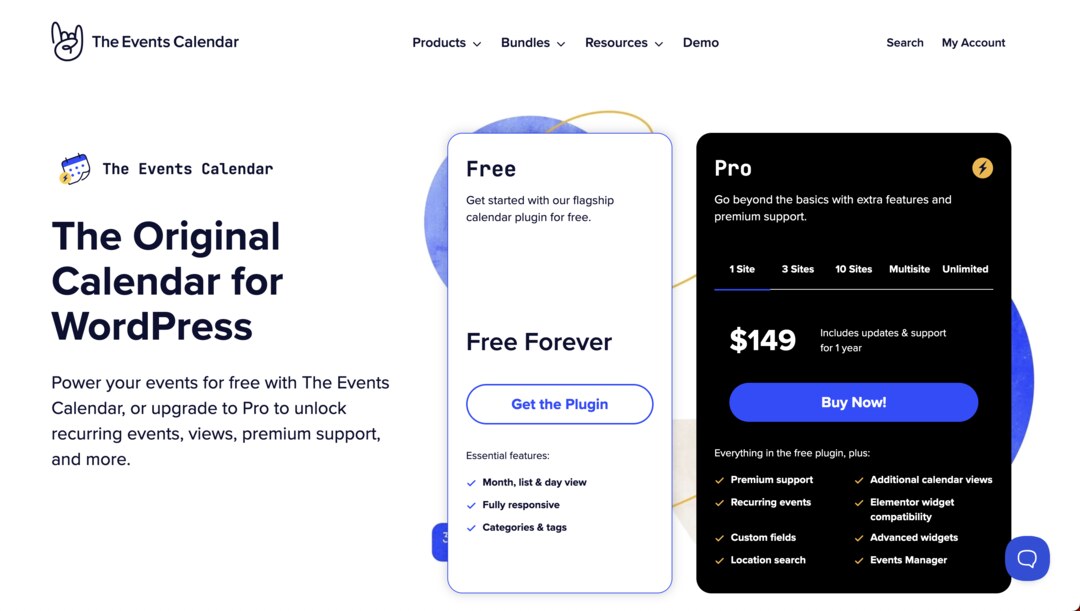
When it comes to events management and community programs, Events Calendar Pro for WordPress is a powerhouse.
In today’s digital-first world, event management has gone far beyond paper flyers and word of mouth. Whether you’re hosting in-person workshops, livestreamed webinars, or hybrid conferences, people expect to find clear event details online – and to be able to RSVP, buy tickets, and add events to their calendars with just a few clicks.
If you’re running a WordPress website, one of the best solutions on the market is The Events Calendar, a suite of plugins that help you create, manage, and promote events with ease. At the heart of this toolkit is Events Calendar Pro, the premium upgrade that unlocks advanced features for serious event organizers. But that’s just the beginning — The Events Calendar ecosystem includes powerful add-ons for tickets, community submissions, virtual events, and more.
This comprehensive guide will walk you through Events Calendar Pro and all the related products and add-ons so you can decide which setup is right for your website.
The Foundation: The Events Calendar (Free + Pro)
The core of the suite is The Events Calendar plugin. The free version is widely used — over 800,000 WordPress sites rely on it to display events in a clean, user-friendly calendar. Out of the box, you get:
- Month and List Views: Visitors can toggle between a monthly calendar or a list of upcoming events.
- Event Pages: Each event has its own detail page with description, date, time, and location.
- Basic Organizer and Venue Info: You can add a simple venue name, address, or organizer name.
- Google Maps Integration: Display locations visually with embedded maps.
For individuals or small organizations, the free plugin is a solid option. But if you run multiple events, need recurring schedules, or want to present your events more professionally, the upgrade to Events Calendar Pro is worth every penny.
Why Upgrade to Pro?
Events Calendar Pro enhances the free plugin with features that save time, improve usability, and add design flexibility. Here are some of the highlights:
- Recurring Events: Set up repeating schedules (daily, weekly, monthly, yearly) without recreating each event. Perfect for fitness classes, church services, or monthly meetups.
- Advanced Views: Go beyond the basic month/list views with additional layouts like Week View, Map View, Photo View, and Summary View. Each one is mobile-friendly and designed to look great.
- Venue and Organizer Management: Create reusable profiles for regular venues and event hosts, complete with contact details and maps.
- Custom Fields: Add unique information like “Required Materials,” “Dress Code,” or “Capacity Limit” so attendees get all the details upfront.
- Widgets and Shortcodes: Display upcoming events in sidebars, footers, or even on your homepage with simple shortcodes.
- Premium Support: Access dedicated help from the Events Calendar team.
By upgrading, your calendar transforms from a basic listing into a polished event hub that’s easier to manage and more engaging for visitors.

Event Tickets and Event Tickets Plus
Most events aren’t just about showing up — they require some kind of registration or ticket purchase. That’s where Event Tickets comes in.
The free Event Tickets plugin allows you to:
- Offer RSVP options directly from your event page.
- Collect attendee details like names and emails.
- Send confirmation emails automatically.
This is a great start, especially for free community events or small workshops.
But for professional event management, you’ll want Event Tickets Plus, the premium upgrade. It integrates with WooCommerce or Easy Digital Downloads, allowing you to:
- Sell paid tickets with multiple pricing tiers.
- Generate scannable QR codes for fast check-in.
- Create custom registration fields (dietary restrictions, T-shirt size, etc.).
- Track inventory and attendee lists in real time.
Together, Event Tickets and Tickets Plus turn your WordPress site into a fully functional ticketing platform. Instead of sending users to third-party platforms, you can keep everything in-house, which means fewer fees and more control over the customer experience.
Virtual Events Add-On
The rise of remote work and online communities has made virtual events an essential part of many organizations’ strategies. The Virtual Events add-on helps you seamlessly host and promote online gatherings.
Key features include:
- Native Integration with Zoom, Google Meet, and Webex: Easily connect your event to the platform of your choice.
- Automated Meeting Links: Private links are automatically generated and can be shown only to registered attendees.
- Time Zone Support: Clearly display event times in the visitor’s local time.
- Online Event Filters: Allow users to filter your calendar by “Virtual Events” vs. “In-Person Events.”
This add-on is invaluable for businesses running webinars, training sessions, or hybrid events. It helps you present virtual gatherings with the same clarity and professionalism as in-person events.

Community Events and Community Tickets
Sometimes, the best events come from your audience itself. The Community Events add-on empowers visitors to submit their own events directly from your website.
How it works:
- Users fill out a frontend form with event details.
- You decide whether to allow instant publishing or moderate submissions before they go live.
- Submitted events appear in your main calendar alongside your own.
This feature is ideal for nonprofits, local organizations, schools, or magazines that want to crowdsource events from the community. It encourages engagement and builds a sense of ownership among your audience.
Want to take it a step further? Add Community Tickets, which combines Community Events with Event Tickets Plus. This allows community members not only to submit events but also to sell tickets to them. Revenue can even be split between the site owner and the event organizer, creating a shared marketplace for events.
Event Aggregator
If your events are spread across multiple platforms, the Event Aggregator add-on helps you bring them all into one central calendar.
With Event Aggregator, you can import events from:
- Meetup
- iCal feeds
- Google Calendar
- Eventbrite
You can schedule automatic imports or run them manually, ensuring your calendar is always up to date without endless copy-and-paste. For organizations that curate events from different partners or platforms, this tool is a huge time saver.
Filter Bar
As your calendar grows, so does the challenge of helping users find the events that matter to them. That’s where the Filter Bar add-on comes in.
It adds a powerful, user-friendly set of filters to your event views, allowing visitors to narrow down results by:
- Event category
- Tag
- Venue
- Organizer
- Time of day
- Cost
This creates a better user experience and helps ensure visitors don’t leave frustrated because they couldn’t find what they were looking for. For large event calendars — like universities, venues, or city directories — Filter Bar is practically essential.
Eventbrite Integration
Eventbrite is one of the most popular platforms for event promotion and ticket sales. If you’re already using it, the Eventbrite Integration add-on lets you seamlessly connect it with your WordPress site.
With this integration, you can:
- Import Eventbrite events into your WordPress calendar.
- Create new events in WordPress and push them to Eventbrite.
- Sell tickets through Eventbrite while showcasing events natively on your site.
It’s the best of both worlds: you keep your WordPress calendar as your central hub while taking advantage of Eventbrite’s built-in promotional tools.
Promoter
Managing events doesn’t stop when you publish them. You also need to market them. That’s where Promoter comes in — an email automation tool built specifically for The Events Calendar ecosystem.
Promoter allows you to:
- Send automated email reminders to attendees.
- Follow up after events with thank-you notes or feedback requests.
- Announce new events to your subscriber list.
- Segment messages based on event type or audience.
By automating communication, Promoter keeps your attendees engaged without requiring hours of manual outreach.
Developer Tools and Compatibility
One of the reasons The Events Calendar suite is so widely adopted is its developer-friendly design. Advanced users and agencies can take advantage of:
- Custom templates for event views.
- Hooks and filters for modifying functionality.
- Compatibility with the Gutenberg Block Editor.
- REST API support for integrating with other tools.
This makes it highly adaptable, whether you’re running a small blog or a complex multi-site network.
Pricing, Licenses, and Bundles
Each product in the suite is sold individually, with annual licenses that include updates and premium support. However, if you know you’ll need multiple add-ons, bundle pricing provides great value.
Popular bundles include:
- Events Calendar Pro + Event Tickets Plus: Perfect for organizations that need advanced calendars and ticket sales.
- Agency Bundle: Designed for developers managing multiple client sites.
- Nonprofit Program: Discounts for eligible nonprofits.
While the cost can add up if you need several add-ons, the investment is often offset by the time saved and the professional polish these tools provide.
Pros and Cons of The Events Calendar Ecosystem
Like any platform, The Events Calendar suite has strengths and weaknesses.
Pros:
- Scalable — works for small sites and large organizations.
- Wide range of add-ons to tailor your setup.
- Strong SEO benefits with structured event data.
- Active support and developer community.
- Seamless integration with WordPress and WooCommerce.
Cons:
- Premium features require multiple add-ons, which can increase cost.
- Styling customization sometimes requires CSS tweaks.
- Learning curve if you’re using many add-ons together.
Is Events Calendar Pro (and the Suite) Worth It? We think so!
If you only need to display a handful of events per year, the free version of The Events Calendar will serve you well. But for organizations where events are central to your mission — whether you’re a venue, nonprofit, school, or business — upgrading to Events Calendar Pro and adding the right mix of add-ons is a smart investment.
Instead of juggling multiple platforms, you can manage everything from your WordPress dashboard: events, tickets, virtual links, community submissions, and even marketing automation. Visitors get a seamless experience, search engines see your site as more authoritative, and you save countless hours of admin work.
In short, The Events Calendar suite isn’t just a plugin — it’s a full-fledged event management system for WordPress. With the right combination of Pro and add-ons, you can create a calendar that not only looks great but also drives attendance, sales, and community engagement.